
Acronis True Image Review
Losing important files can happen at any time. Hardware failure, ransomware attacks, accidental deletion, or system crashes can erase valuable data in seconds. A reliable backup solution helps protect your files before disaster strikes.
In this Acronis True Image Review, we examine its backup performance, disk cloning, cloud backup, ransomware protection, pricing, and ease of use. We also compare its strengths and limitations to help you decide whether Acronis True Image is the right backup software for your Windows or Mac device.
- ✔ Full System Backup
- ✔ Disk Cloning & Migration
- ✔ Ransomware Protection
- ✔ Cloud Backup & Recovery
- ✔ Windows & Mac Support
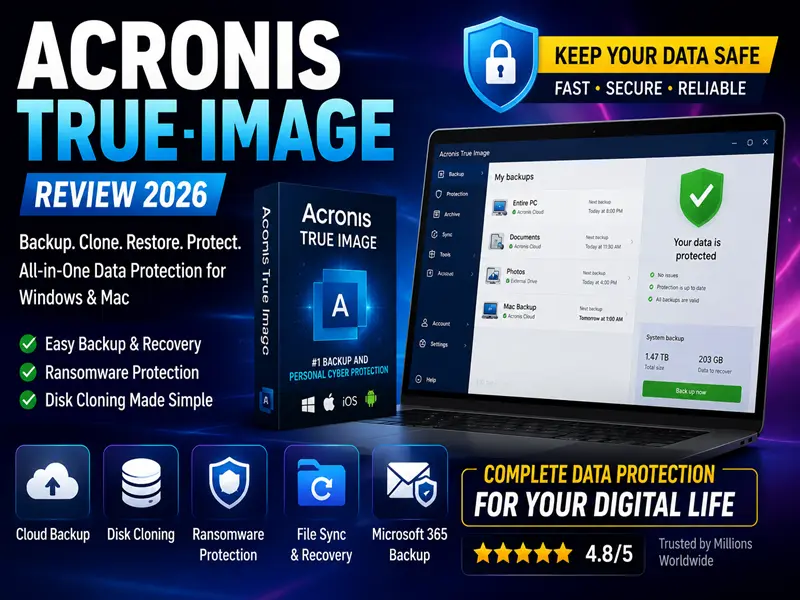

Acronis True Image Score: 9.5/10
👁️ Reliable full system and file backup
👁️ Fast disk cloning for SSD and HDD upgrades
👁️ Built-in ransomware protection for critical data
👁️ Secure cloud backup with flexible recovery options
👁️ Easy-to-use interface for Windows and Mac users
Why Choose Acronis True Image
✅ Full System Backup for Windows and Mac
✅ Fast Disk Cloning and Drive Migration
✅ Built-in Ransomware Protection
✅ Secure Cloud Backup and Recovery
✅ Flexible Backup Scheduling
✅ Easy-to-Use Dashboard
What Could Improve
❌ No permanent free plan
❌ Cloud storage is limited on entry-level plans
❌ Advanced features require higher-tier subscriptions
❌ Initial full backup may take longer on large drives
Acronis True Image Review
Acronis True Image Rating 9.5 / 10
✔ Full System Backup
✔ Disk Cloning & Migration
✔ Ransomware Protection
✔ Cloud Backup & Recovery
✔ Windows & Mac Compatibility
✔ Fast Recovery Options
✔ Protects your entire system
✔ Secure cloud backup
✔ Flexible recovery options
✔ Easy disk cloning
✔ Trusted by millions worldwide

Acronis True Image Pricing & Subscription Plans
Acronis True Image offers flexible backup and cybersecurity plans for Windows and Mac users. Every plan includes secure backup, ransomware protection, disk cloning, and fast recovery tools. Pricing and available features may change over time, so always check the official Acronis website for the latest plans and discounts.
Essential Backup
Essentials
Starting From $49.99
Best for Personal Backup
Secure backup with built-in ransomware protection
30-day money-back guarantee
✔ 1-Year License
✔ Protects Up to 5 Devices
✔ Supports Windows & macOS
Key Features
✔ Full Image Backup
Backup & Recovery
✔ Complete System Image Backup
✔ Active Disk Cloning
✔ Fast File & Folder Recovery
Security Features
✔ Built-in Ransomware Protection
Cloud Backup
✔ Secure Cloud Backup
Most Popular
Advanced
Starting From $89.99
Best Value
Cloud backup with advanced cyber protection
30-day money-back guarantee
✔ 1-Year License
✔ Protects Up to 5 Devices
✔ Cloud Backup Included
Key Features
✔ Everything in Essentials
Backup & Recovery
✔ Full Image Backup
✔ Backup Synchronization
✔ Microsoft 365 Backup
Security Features
✔ Built-in Ransomware Protection
✔ Flexible Backup Scheduling
Cloud Backup
✔ Secure Cloud Storage
✔ Priority Technical Support
Premium Protection
Premium
Starting From $124.99
Maximum Protection
Complete backup, cloud protection, and digital security
30-day money-back guarantee
✔ 1-Year License
✔ Protects Up to 5 Devices
✔ Premium Cloud Storage
Premium Features
✔ Everything in Advanced
Backup & Recovery
✔ Full Image Backup
✔ Active Disk Cloning
✔ Fast Disaster Recovery
Security Features
✔ Advanced Ransomware Protection
✔ Blockchain File Certification
✔ Electronic Signature
Cloud Backup
✔ Premium Cloud Backup
✔ Digital Identity Protection
Acronis True Image Features & Security Tools
Acronis True Image combines advanced backup, cyber protection, and recovery tools in one platform. It helps protect Windows and Mac devices with full image backup, active disk cloning, ransomware protection, secure cloud backup, and fast disaster recovery for personal and business users.
Full Image Backup — Create a complete image of your entire system, including Windows or macOS, applications, settings, and personal files for fast and reliable recovery.
Active Disk Cloning — Clone your hard drive or SSD without restarting your computer, making upgrades and system migration simple.
Built-in Ransomware Protection — AI-powered ransomware protection helps detect, block, and recover from ransomware attacks before your files are encrypted.
Secure Cloud Backup — Store important files safely in the Acronis Cloud with end-toend encryption and restore them whenever needed.
Microsoft 365 Backup — Automatically back up Outlook, OneDrive, and Microsoft 365 data to protect emails, files, and business information.
Fast Disaster Recovery — Restore your entire system, individual files, or applications quickly after hardware failure, ransomware, or accidental deletion.
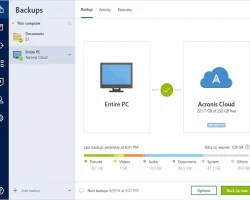
Acronis True Image Dashboard
Acronis True Image Performance & System Impact
Acronis True Image is built to deliver reliable backup, disk cloning, and ransomware protection without slowing down your computer. It is optimized for Windows and macOS, helping you protect important data while maintaining fast system performance during everyday use.
Lightweight System Performance — Acronis True Image runs efficiently in the background, allowing backups to complete with minimal impact on everyday productivity.
Real-Time Ransomware Protection — Active Protection monitors suspicious activity and helps stop ransomware before it can encrypt your files.
Fast Backup & Recovery — Create full system images and restore files, folders, or your entire PC quickly when needed.
Low System Impact — Acronis True Image is optimized to use system resources efficiently during backup and recovery tasks, helping maintain smooth performance for everyday work.
Optimized for Windows & macOS — Fully compatible with Windows and macOS, delivering reliable backup, cloning, cloud protection, and long-term data security.
Acronis True Image Security & Protection Features
Acronis True Image combines advanced backup technology with built-in cyber protection to keep your files safe from ransomware, accidental deletion, and hardware failure. It helps secure Windows and macOS devices through Active Protection, encrypted cloud backup, and reliable disaster recovery.
Active Ransomware Protection — Acronis Active Protection monitors suspicious behavior and helps stop ransomware attacks before your files are encrypted.
Encrypted Cloud Backup — Store backups securely in Acronis Cloud using strong encryption to protect sensitive files and personal data.
Full System Image Protection — Create complete system image backups so you can restore your operating system, applications, settings, and files whenever needed.
Automatic Backup Scheduling — Schedule backups to run automatically in the background, ensuring your data stays protected without manual effort.
Disk Cloning & Recovery — Clone your hard drive or SSD and recover your entire system quickly after hardware failure or data loss.
Secure Windows & macOS Support — Acronis True Image provides reliable backup, cloning, cloud protection, and cyber protection for both Windows and macOS devices.
Acronis True Image Compatibility & Device Support
Acronis True Image is compatible with Windows and macOS, offering reliable backup, disk cloning, ransomware protection, and cloud backup. It is easy to install, simple to use, and suitable for home users, professionals, and small businesses.
Windows & macOS Support — Acronis True Image fully supports the latest versions of Windows and macOS, delivering reliable backup and recovery for everyday users.
Desktop & Laptop Compatibility — Works seamlessly with desktops, laptops, external drives, and SSDs from major hardware manufacturers.
Multi-Device Protection — Depending on your subscription plan, you can protect multiple devices under one account, making it ideal for families and small businesses.
Automatic Backup Scheduling — Schedule automatic backups to keep your files protected without manual intervention.
Easy Installation & Setup — Install Acronis True Image in minutes with a simple interface designed for both beginners and advanced users.
Home & Business Use — Suitable for home users, remote workers, professionals, and small businesses that need reliable backup, cloning, and cyber protection.
Acronis True Image Customer Support & Ease of Use
Acronis True Image offers reliable customer support and an intuitive interface designed for both beginners and advanced users. Backup, disk cloning, cloud protection, and recovery tools are easy to set up, making data protection simple on Windows and macOS.
Reliable Customer Support — Acronis provides online documentation, a comprehensive knowledge base, community resources, and customer support to help users resolve technical issues efficiently.
Easy Installation Process — Installation is quick and straightforward, allowing you to start protecting your files and system within minutes.
User-Friendly Dashboard — The clean and modern dashboard makes it easy to manage backups, recovery, disk cloning, cloud storage, and security settings from one place.
Automatic Backup Scheduling — Set automatic backup schedules so your important files remain protected without requiring manual action.
Smooth Everyday Performance — Acronis True Image is optimized to perform backups efficiently while minimizing the impact on everyday system performance.
Ideal for Home & Business Users — Suitable for home users, professionals, remote workers, and small businesses that need reliable backup, cloning, ransomware protection, and disaster recovery.
Acronis True Image Security & Performance
Acronis True Image combines reliable backup, ransomware protection, and system recovery with efficient performance. It helps protect your files while running smoothly in the background, making it ideal for Windows and macOS users.
Active Ransomware Protection — Acronis Active Protection continuously monitors suspicious activity and helps stop ransomware before it can encrypt your files.
Fast Backup Performance — Create full system image backups, incremental backups, and file backups quickly with minimal impact on everyday performance.
Encrypted Cloud Protection — Secure your backups in Acronis Cloud using strong encryption, helping protect sensitive files from unauthorized access.
Optimized for Windows & macOS — Fully compatible with Windows and macOS, providing reliable backup, recovery, disk cloning, and cyber protection.
Lightweight System Performance — Optimized to perform backups efficiently in the background while minimizing CPU and system resource usage.
Automatic Backup Scheduling — Schedule automatic backups to ensure your important files are always protected without manual intervention.
Acronis True Image Pros & Cons
Acronis True Image offers comprehensive backup, disk cloning, ransomware protection, and cloud recovery features. While it is one of the most complete backup solutions available, there are a few limitations depending on your budget and backup requirements.
👁 What We Like
Full Image Backup — Create complete system image backups for fast disaster recovery.
Active Disk Cloning — Clone HDDs or SSDs without reinstalling Windows or losing data.
Built-in Ransomware Protection — AI-powered Active Protection helps detect and block ransomware attacks.
Secure Cloud Backup — Store backups safely in Acronis Cloud with end-to-end encryption.
Windows & macOS Support — Fully compatible with both Windows and macOS devices.
Microsoft 365 Backup — Automatically back up Outlook, OneDrive, and Microsoft 365 data.
🟠 What Could Improve
No Permanently Free Version — Acronis True Image does not offer a permanently free plan.
Cloud Storage Depends on Plan — Cloud storage capacity varies by subscription plan.
Higher Renewal Pricing — Renewal pricing may be higher than the introductory first-year price.
Advanced Features Require Higher Plans — Some advanced cybersecurity and cloud features are available only in premium plans.
Learning Curve for Beginners — New users may need time to explore all backup and recovery features.
Final Verdict: Is Acronis True Image Worth It?
Acronis True Image is one of the most complete backup and cyber protection solutions available for Windows and macOS users. It combines full image backup, active disk cloning, ransomware protection, secure cloud backup, and Microsoft 365 backup in a single platform, making it an excellent choice for both home users and professionals.
While there is no permanently free version and some cloud features depend on your subscription plan, Acronis delivers outstanding value through reliable backup, fast recovery, strong security, and an easy-to-use interface.
If your priority is protecting important files, recovering your entire system quickly, and defending against ransomware, Acronis True Image is definitely worth considering.
Best For
- Windows & macOS Users
- Full Image Backup
- Active Disk Cloning
- Ransomware Protection
- Home & Business Users
Acronis True Image Rating
⭐⭐⭐⭐⭐ 4.9 / 5
Frequently Asked Questions (FAQ)
Find quick answers about Acronis True Image features, backup, disk cloning, ransomware protection, cloud storage, pricing, and compatibility.
❓Is Acronis True Image available for both Windows and macOS?
Yes. Acronis True Image supports both Windows and macOS, allowing you to back up, restore, and protect your devices with a single solution.
❓ Does Acronis True Image protect against ransomware?
Yes. Acronis Active Protection uses AI-based ransomware detection to help prevent unauthorized encryption and protect your important files.
❓ Can Acronis True Image clone an SSD or hard drive?
Yes. Acronis True Image includes Active Disk Cloning, making it easy to migrate your operating system and files to a new SSD or HDD without reinstalling Windows.
❓Does Acronis True Image include cloud backup?
Yes. Selected subscription plans include secure Acronis Cloud Backup with end-to-end encryption for protecting important files online.
❓ Is Acronis True Image worth it?
If you need reliable full-image backup, fast disaster recovery, disk cloning, ransomware protection, and secure cloud backup, Acronis True Image is one of the best all-in-one backup solutions available.
Protect Your Data with Acronis True Image Today
Acronis True Image helps protect your Windows and macOS devices from data loss, ransomware, hardware failure, and accidental deletion. Its powerful backup, disk cloning, cloud protection, and AI-powered ransomware defense keep your files secure while ensuring fast recovery whenever you need it.
✔ Full Image Backup & Fast Recovery
✔ Active Ransomware Protection
✔ Secure Cloud Backup
Citations
1. Acronis. Acronis True Image – Official Features & Backup Solution — https://www.acronis.com/
2. Acronis. Acronis True Image Pricing & Plans — https://www.acronis.com/
3. Cybersecurity and Infrastructure Security Agency (CISA). Stop Ransomware Resources — https://www.cisa.gov/
4. National Institute of Standards and Technology (NIST). Cybersecurity Framework (CSF 2.0) — https://www.nist.gov/cyberframework
Explore Related Articles

Written By
Alex Carter
Cybersecurity & Data Protection Researcher
Alex Carter is a U.S.-focused cybersecurity researcher specializing in backup software, ransomware protection, disaster recovery, cloud backup, and data security. He evaluates backup and cyber protection solutions based on reliability, recovery performance, ease of use, security features, pricing, and overall value for both home and business users.
His research focuses on independent product testing, trusted cybersecurity standards, transparent comparisons, and practical recommendations that help users choose reliable backup and recovery software. Every review follows Google’s E-E-A-T best practices to provide accurate, unbiased, and user-focused information.

TopCreditQuote helps U.S. users compare the best identity theft protection USA, credit monitoring services, and security tools with clear, unbiased research and beginner-friendly guidance.
Quick Links
Top Categories
📍 Address: Trailwoods Condo, Port Orange, Florida, USA
✉️ Email: info@topcreditquote.com
© 2026 TopCreditQuote. All rights reserved.
TopCreditQuote may earn commissions from identity protection, VPN, privacy, and cybersecurity tools at no extra cost to you.